

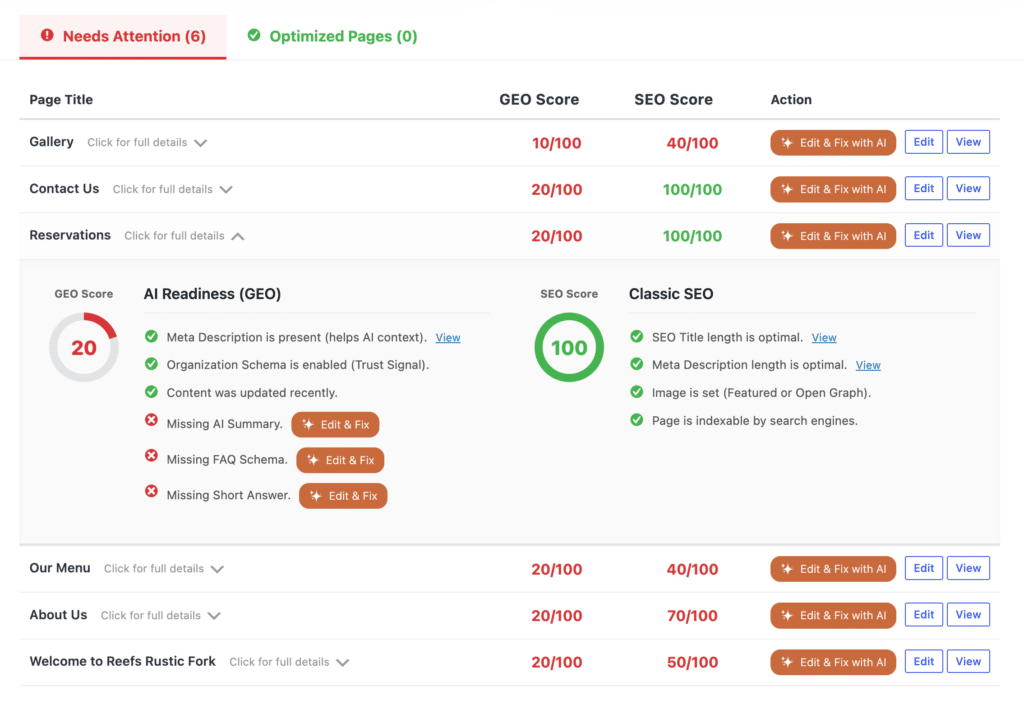
The SEO & GEO Dashboard in ByTheWeb GEO gives you a site-wide view of the optimization status of your published WordPress content.
Instead of opening each page or post individually, you can use the Dashboard to identify content that needs attention, review its GEO and applicable SEO checks, open detailed feedback, and continue directly to editing or AI-assisted improvements.
For a general product overview, see:
SEO & GEO Dashboard Feature Overview
Where Is the SEO & GEO Dashboard?
In your WordPress Dashboard, open:
ByTheWeb > Dashboard
The Dashboard is provided by ByTheWeb GEO.
Access to the main Dashboard is based on the WordPress edit_others_posts capability.
For more information about WordPress permissions, see:
User Access Control & Permissions
What Does the Dashboard Analyze?
The Dashboard works with the post types enabled for GEO and, when applicable, ByTheWeb’s own Classic SEO tools.
By default, ByTheWeb GEO supports Posts and Pages, while additional public post types can be enabled through the plugin settings where supported.
The main Dashboard table analyzes published content.
Drafts are not included in the main site-wide Dashboard table.
You can still work with supported GEO and SEO fields directly while editing individual content.
What Are the GEO and SEO Scores?
Depending on your SEO provider and plugin configuration, the Dashboard can show:
- GEO Score
- SEO Score
Each applicable score is calculated on a scale from:
0 to 100
These are ByTheWeb’s internal optimization scores based on the checks described below.
A score is not a Google ranking score, an AI-engine score, or a guarantee that a page will rank, appear in an AI answer, receive traffic, or be cited.
A score of 100 means that the content received all available points under the current ByTheWeb checks that apply to that item.
What Is the GEO Score?
The GEO Score evaluates whether the content contains the main elements that ByTheWeb GEO currently checks for AI-readiness and structured content preparation.
For a standard published post or page, the current GEO Score is divided into six checks.
GEO Score: AI Summary
30 points
ByTheWeb checks whether an AI Summary has been saved for the content.
If an AI Summary exists:
+30 points
If it is missing:
0 points for this check
The AI Summary can be written manually without using AI credits.
If ByTheWeb AI is connected, supported AI actions can also be used to generate it.
Learn more:
GEO Score: FAQ Schema
30 points
ByTheWeb checks whether FAQ data exists for the current content.
If FAQ Schema data is present:
+30 points
If it is missing:
0 points for this check
FAQ Questions and Answers can be added manually without AI credits.
ByTheWeb AI can also generate FAQ content through a supported AI action.
Learn more:
GEO Score: Short Answer
20 points
ByTheWeb checks whether a Short Answer has been saved for the current content.
If a Short Answer exists:
+20 points
If it is missing:
0 points for this check
Like the AI Summary, the Short Answer can be entered manually or generated through ByTheWeb AI when the connected AI functionality is available.
Learn more:
GEO Score: Meta Description
10 points
The behavior of this check depends on which plugin is currently responsible for traditional SEO.
If ByTheWeb GEO is managing SEO, ByTheWeb checks whether a Meta Description is available through the ByTheWeb SEO data or its applicable fallback.
If a Meta Description is present:
+10 points
If it is missing:
0 points for this check
If a supported external SEO provider such as Yoast SEO or Rank Math SEO is active, ByTheWeb GEO leaves that SEO field under the external provider’s control.
In that situation, ByTheWeb GEO does not inspect the external plugin’s Meta Description for this GEO check and includes the 10 points for this component.
This avoids using the ByTheWeb GEO score to evaluate an SEO field that another supported SEO plugin owns.
GEO Score: Organization Schema
5 points
ByTheWeb checks whether the Organization Schema option is enabled.
If it is enabled:
+5 points
If it is disabled:
0 points for this check
Organization and Person configuration is covered separately in:
Primary Entity – Organization & Person
GEO Score: Content Freshness
5 points
For posts and pages, ByTheWeb checks the WordPress last-modified date.
If the content was modified within the previous 180 days:
+5 points
If the last modification was more than 180 days ago:
0 points for this check
This is a scoring check only.
ByTheWeb does not automatically rewrite or update old content simply because it is older than 180 days.
GEO Score Breakdown
For standard post and page analysis, the current GEO Score is:
- AI Summary: 30 points
- FAQ Schema: 30 points
- Short Answer: 20 points
- Meta Description: 10 points
- Organization Schema: 5 points
- Content Freshness: 5 points
Maximum: 100 points
What Is the Classic SEO Score?
The separate SEO Score is ByTheWeb GEO’s own Classic SEO score.
It is calculated only when ByTheWeb GEO is responsible for the applicable traditional SEO functionality.
For a standard post or page, the current Classic SEO score checks:
- SEO Title length
- Meta Description length
- Image presence
- Indexability
SEO Score: SEO Title Length
30 points
The current target range is:
30 to 65 characters (UPDATE: from ver 1.3.1: 10 to 100 characters)
If the evaluated SEO Title is within that range:
+30 points
Otherwise:
0 points for this check
SEO Score: Meta Description Length
30 points
The current target range is:
120 to 160 characters – UPDATE: from ver 1.3.1: 50 to 200 characters
If the evaluated Meta Description is within that range:
+30 points
Otherwise:
0 points for this check
SEO Score: Image Presence
20 points
For this check, the page receives the points if at least one supported image source is available, including:
- A WordPress Featured Image
- A ByTheWeb Open Graph image for the content
- An applicable global Open Graph or social image configured through ByTheWeb GEO
If an applicable image is found:
+20 points
Otherwise:
0 points for this check
Learn more:
SEO Score: Indexability
20 points
ByTheWeb checks whether the content is currently configured as indexable under the applicable ByTheWeb robots setting.
If it is not set to noindex:
+20 points
If it is set to noindex:
0 points for this check
The calculation can use the content-level robots setting or the applicable ByTheWeb post-type/global fallback.
Learn more:
Classic SEO Score Breakdown
When ByTheWeb GEO is the applicable SEO provider, the current post/page SEO Score is:
- SEO Title validity: 30 points
- Meta Description validity: 30 points
- Image presence: 20 points
- Indexability: 20 points
Maximum: 100 points
What Happens If I Use Yoast SEO or Rank Math?
ByTheWeb GEO is provider-aware.
When a supported external SEO provider such as Yoast SEO or Rank Math SEO is active, ByTheWeb GEO does not calculate its own competing Classic SEO score for that content.
The external SEO plugin remains responsible for its overlapping traditional SEO functionality.
ByTheWeb GEO continues its GEO analysis and its non-overlapping GEO functionality.
This means you should not interpret the absence of a ByTheWeb Classic SEO score in this configuration as an SEO error.
It means that ByTheWeb is intentionally leaving the traditional SEO layer to the active supported SEO provider.
For a broader explanation of how the plugins work together, see:
Does the Dashboard Score Yoast or Rank Math SEO?
No.
When Yoast SEO or Rank Math SEO is the active supported external SEO provider, ByTheWeb GEO does not calculate a second ByTheWeb Classic SEO score from that provider’s SEO data.
This prevents the Dashboard from presenting a competing ByTheWeb SEO score for fields managed by another supported SEO plugin.
The GEO Score remains available for applicable ByTheWeb GEO checks.
What Is “Needs Attention”?
The Dashboard separates content into:
Needs Attention
and:
Optimized
A published content item is placed under Needs Attention when at least one score that currently applies to that item is below 100.
For example:
- If only GEO scoring applies and the GEO Score is 80, the item needs attention.
- If both GEO and ByTheWeb SEO scoring apply and GEO is 100 but SEO is 80, the item still needs attention.
- If both scores apply and both are 100, the item can be placed under Optimized.
“Needs Attention” does not mean the page is broken.
It means that one or more of the current ByTheWeb scoring checks has not received its full points.
What Is “Optimized”?
The Optimized section contains content that has reached 100 for every score currently applicable to that item.
If only the GEO Score applies:
GEO must be 100
If both GEO and ByTheWeb Classic SEO scores apply:
Both must be 100
Again, “Optimized” refers specifically to the ByTheWeb checks.
It is not a guarantee of search rankings, traffic, indexing, AI citations, or other third-party results.
Which Pages Appear First in Needs Attention?
The Dashboard sorts the Needs Attention list so that content with the lowest applicable score is prioritized first.
When both GEO and SEO scores apply, the lower of the two scores is used for this ordering.
This helps surface content with the largest scoring gaps toward the top of the list.
How Do I See the Full Details for a Page?
Each content row includes:
Click for full details
Open the row to see the detailed feedback behind its applicable score or scores.
The expanded information shows which checks passed and which checks still need attention.
This lets you understand why a page has its current score before deciding whether to make any changes.
What Actions Are Available for Each Page?
Depending on the content and the plugins currently active, the Dashboard can provide the following actions:
Edit
Opens the WordPress editing screen for that content.
View
Opens the published frontend page.
Edit & Fix with AI
Appears for supported issues when ByTheWeb AI is available.
This opens the AI-assisted workflow for supported fields rather than requiring you to leave the Dashboard and find each field manually.
Do I Need ByTheWeb AI to Use the Dashboard?
No.
The SEO & GEO Dashboard itself is part of ByTheWeb GEO.
You can:
- View applicable GEO and SEO scores
- Review Needs Attention and Optimized content
- Expand detailed feedback
- Open content for editing
- Fix supported fields manually
without using AI credits.
ByTheWeb AI is optional and is used for AI-powered generation and supported Fix with AI actions.
Learn more:
Does Viewing or Refreshing the Dashboard Use AI Credits?
No.
The Dashboard’s normal scoring and reporting are local ByTheWeb GEO functionality.
Simply opening the Dashboard, reviewing scores, or checking the detailed feedback does not use AI credits.
Credits are relevant when you intentionally run a supported AI-powered generation action through ByTheWeb AI.
For current credit rules, see:
Can I Fix an Issue Manually?
Yes.
The Dashboard does not require you to use AI to improve a score.
You can open the content with Edit and manually add or change the applicable fields.
For example, depending on your setup, you can manually work with:
- AI Summary
- Short Answer
- FAQ
- SEO Title
- Meta Description
- Featured or social image
- Robots settings
The exact SEO fields available through ByTheWeb depend on the active SEO provider.
If Yoast SEO or Rank Math SEO owns the traditional SEO layer, make overlapping SEO changes through that provider rather than through ByTheWeb GEO.
Does Fix with AI Automatically Change Every Issue?
No.
Edit & Fix with AI is available only for supported AI-assisted fields and only when the required ByTheWeb AI functionality is available.
The Dashboard can also report checks that are not simply content-generation actions.
For example, indexability or site-wide configuration may require a manual configuration change rather than generated text.
For the dedicated workflow, see:
Does the Dashboard Analyze Drafts?
The main site-wide Dashboard table currently works with:
Published content
Draft posts are not included in that main table.
A draft can still contain ByTheWeb fields and can be edited before publication, but it will not appear as a normal published item in the main Dashboard list until it is published.
Does the Dashboard Analyze Every Custom Post Type Automatically?
No.
Dashboard coverage depends on the post types enabled in the ByTheWeb GEO configuration.
This is important on websites that use custom post types.
If a supported public post type is not enabled for the relevant ByTheWeb functionality, you should not expect it to appear automatically in that Dashboard analysis.
Can GEO and SEO Be Enabled for Different Post Types?
Yes.
ByTheWeb GEO keeps separate configuration for the post types used by its GEO functionality and the post types used by its own SEO functionality.
As a result, the information shown in the Dashboard can differ by selected content type.
One content type may use GEO analysis, while another may have both GEO and ByTheWeb SEO analysis enabled.
The active external SEO provider can also change whether the ByTheWeb SEO Score is applicable.
What Does the Dashboard Menu Badge Mean?
When issues exist, the main ByTheWeb menu and Dashboard menu can display an issue count badge.
For content, an item contributes to the issue count when one of its applicable ByTheWeb scores is below 100.
When the ByTheWeb AI Media Optimization component is available, media items that require attention can also contribute to the ByTheWeb menu issue count.
The badge is therefore a quick attention indicator and is not itself a GEO Score or SEO Score.
Why Did My SEO Score Disappear After Activating Yoast or Rank Math?
This can be expected behavior.
When a supported external SEO provider becomes active, ByTheWeb GEO stops calculating its own competing Classic SEO score.
The stored ByTheWeb SEO score is also cleared as part of that provider-aware behavior.
The GEO Score continues to be calculated.
This separation helps prevent ByTheWeb GEO from presenting its own traditional SEO assessment while another supported plugin is responsible for those SEO fields.
Why Is My GEO Meta Description Check Receiving Points with Yoast or Rank Math Active?
When a supported external SEO provider manages the Meta Description, ByTheWeb GEO does not inspect that external provider’s value for the GEO Score.
Instead, it treats that component as externally managed and includes its available GEO points.
This is intentional provider-aware behavior.
It avoids making the ByTheWeb GEO Score depend on reading or judging another SEO plugin’s Meta Description.
Why Is a Page Still Under Needs Attention After I Fixed One Issue?
A page moves to Optimized only when every applicable score reaches 100.
For example, adding a missing AI Summary may improve the GEO Score by 30 points, but another missing FAQ or Short Answer can still keep the GEO Score below 100.
If ByTheWeb’s Classic SEO Score also applies, that score must also reach 100 before the page is considered Optimized.
Expand the page row and review the remaining feedback to see which checks are still incomplete.
Why Is a Page Not Appearing in the Dashboard?
Check the following:
- Confirm that the content is published.
- Confirm that its post type is enabled for the relevant ByTheWeb GEO functionality.
- Confirm that your WordPress user has access to the main ByTheWeb Dashboard.
- If you are looking for a ByTheWeb SEO Score, check whether Yoast SEO or Rank Math SEO is currently the active supported SEO provider.
For additional help, see:
How Should I Use the Dashboard?
A practical workflow is:
- Open ByTheWeb > Dashboard.
- Select the content type you want to review.
- Start with Needs Attention.
- Review the lowest-scoring items first.
- Expand a row to see the exact feedback.
- Decide whether each issue should be fixed manually or with a supported ByTheWeb AI action.
- Use Edit when you want to work directly in the WordPress editor.
- Use View to review the published frontend page.
- Recheck the Dashboard after making and saving your changes.
- Continue until the applicable checks reflect the configuration and content you want.
You do not need to force every page to 100 simply because a point is available.
For example, your publishing, indexing, or content strategy may intentionally require a different configuration.
The Dashboard is a diagnostic and optimization tool, while the final decision about each page remains yours.
What Does a 100/100 Score Mean?
A 100/100 score means that all of the current checks included in that particular ByTheWeb score received their available points.
For GEO, that means the current GEO checks used for the item are complete according to the scoring logic.
For ByTheWeb Classic SEO, it means all of the applicable ByTheWeb SEO checks received their points.
It does not mean:
- Guaranteed Google rankings
- Guaranteed indexing
- Guaranteed AI visibility
- Guaranteed inclusion in an AI answer
- Guaranteed citations
- Guaranteed traffic or conversions
The Dashboard measures the specific technical and content signals that ByTheWeb GEO currently evaluates.
Where Should I Go Next?
For the two main GEO content fields:
For FAQ optimization:
For automatic AI-assisted improvements:
For choosing which content is included in GEO:
For the Dashboard product overview: