
Skip to Main Content Enable / Disable keyboard navigation (ENTER key) Accessible Menu Accessibility panel Reset accessibility Sitemap Accessibility statement
AI Visibility & SEO Control

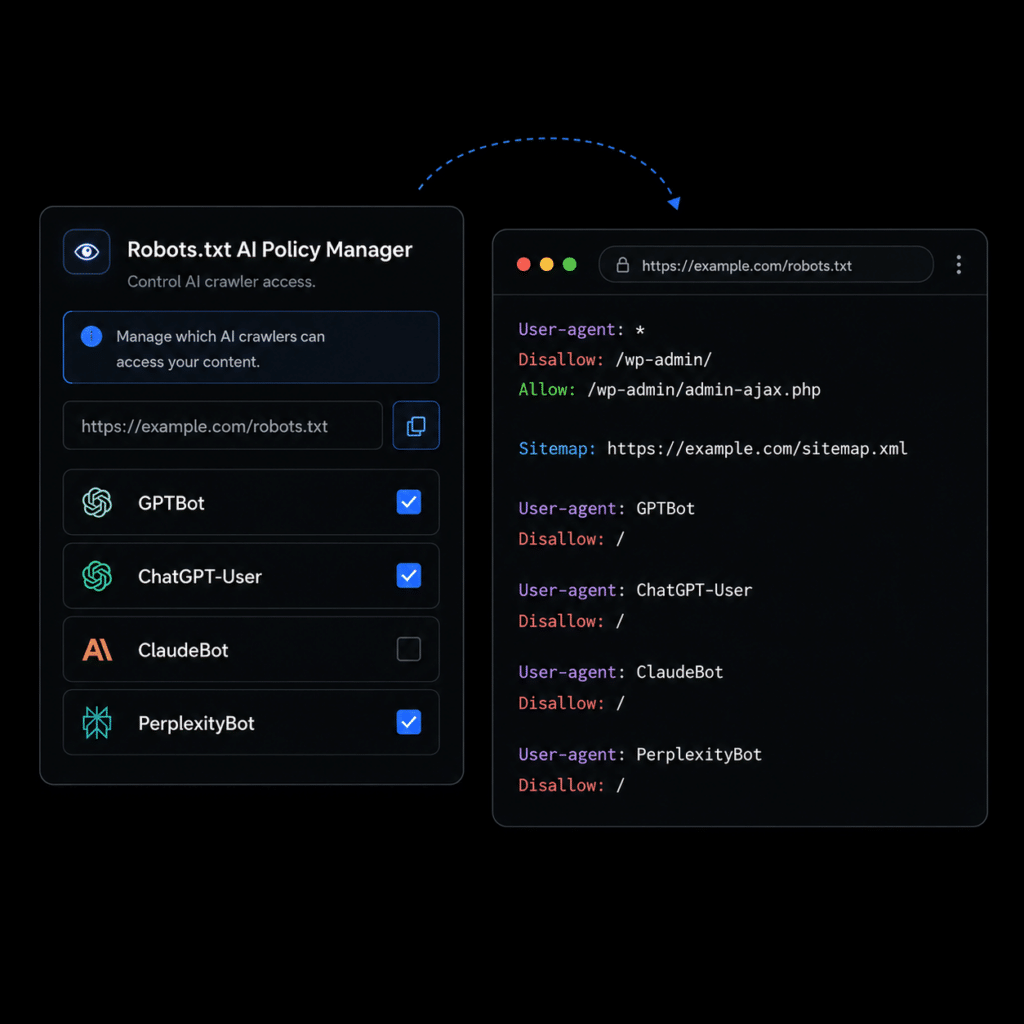
Robots.txt AI Policy Manager

With ByTheWeb GEO Plugin
Control how AI crawlers and search bots access your public website. ByTheWeb GEO keeps your site open by default, adds your sitemap to robots.txt, and lets you selectively block specific AI and search user-agents such as GPTBot, ChatGPT-User, OAI-SearchBot, ClaudeBot, PerplexityBot, Google-Extended, Applebot-Extended, Bingbot, Amazonbot, and Meta AI fetchers.
FREE
Tech Skill Needed:
FREE
โ‡ข Medium

Why this matters?

  • AI crawlers are not all the same. Some discover content for live answers, some support search experiences, and some may be used for AI training or data collection.
  • robots.txt gives your website a clear crawler policy at the site level, helping bots understand what they are allowed to access.
  • By default, ByTheWeb GEO keeps your site open to all crawlers, so your AI visibility is not reduced accidentally.
  • You stay in control: block only the specific user-agents you explicitly want to restrict.

Whatโ€™s Free?

  • Site-level robots.txt management directly inside WordPress.
  • Automatic ByTheWeb GEO sitemap reference in robots.txt when Yoast SEO is not active.
  • Per-bot blocking controls for major AI and search crawlers.
  • Clear warnings when a physical robots.txt file, cache, security plugin, firewall, or server-level rule may affect the final output.

Whatโ€™s with Credits?

No AI credits are required.

Robots.txt AI Policy Manager is a technical SEO and AI visibility control feature.

It does not generate AI content, call an external AI model, or consume ByTheWeb AI credits.

As AI search, answer engines, and autonomous crawlers become more common, your website needs a simple way to define crawler access without editing server files manually.

ByTheWeb GEO adds a dedicated Robots.txt AI Policy Manager that helps you control crawler behavior from inside WordPress. The feature keeps your site open by default, adds your ByTheWeb GEO sitemap to the virtual robots.txt output, and gives you clear per-bot controls for major AI and search user-agents.

You can selectively block crawlers such as GPTBot, ChatGPT-User, OAI-SearchBot, ClaudeBot, Claude-SearchBot, PerplexityBot, Perplexity-User, Google-Extended, Applebot-Extended, Bingbot, Amazonbot, Amzn-SearchBot, Amzn-User, and Meta AI fetchers.

This helps you balance AI visibility with content access control. You can stay discoverable for search and AI platforms while making intentional decisions about which crawlers should or should not access your public content.

Common Questions Answered

Here are some frequently asked questions about Robots.txt AI Policy Manager
Bytheweb 3 dots icon

What does Robots.txt AI Policy Manager do?

It lets you manage AI crawler and search bot access from inside WordPress by adding selected rules to your siteโ€™s virtual robots.txt output.

Are bots blocked by default?

No. ByTheWeb GEO keeps all bots allowed by default. A bot is blocked only when you explicitly enable โ€œBlock in robots.txtโ€ for that specific user-agent.

Does this replace page-level robots meta settings?

No. Page-level robots meta controls manage index/noindex behavior for individual pages. Robots.txt AI Policy Manager controls crawler access at the site/user-agent level.

Can I block GPTBot or Google-Extended?

es. You can selectively block specific AI-related user-agents such as GPTBot, Google-Extended, Applebot-Extended, ClaudeBot, PerplexityBot, and others.

Is robots.txt a security feature?

No. robots.txt is a crawler policy file, not a security system. Well-behaved crawlers usually follow it, but it should not be used to protect private or sensitive content.

Can cache or security plugins affect robots.txt?

Yes. Cache plugins, security plugins, firewalls, server-level rules, or a physical robots.txt file may affect the final robots.txt output.

Does this feature require AI credits?

No. Robots.txt AI Policy Manager does not require AI credits.

What should I block?

By default, you should not block anything unless you have a clear reason. For most websites, the best setup is to stay open to search and AI discovery, and only block specific crawlers you do not want accessing your public content. For example, some site owners may choose to block AI-training related crawlers while keeping search and user-triggered AI crawlers allowed.

Why block AI crawlers at all?

Blocking can be useful when you want more control over how your public content is accessed, reused, or collected by specific bots. Some crawlers may help users discover your website in AI answers or search experiences, while others may be used for broader data collection or AI training. The goal is not to hide your site from AI, but to let you make intentional crawler-access decisions.

Powerful SEO & GEO Tools

Simple for Everyone.
BTW FEATURES FILTER