
Features
What can you do with our plugin?
Completely Free
No account needed
Manually Add FAQ Schema to any page or post.
SEO Analysis tool
Manage Alt/Title/Caption/Description include report.
See All titles, descriptions on one place
Advanced AI
Add-Ons (Credits)
Automatically Generated by content FAQ Schema to any page or post.
AI content creator to professional posts in any language.
AI Generated Alt/Title/Caption/Description by image.
AI Generated prompt tool for post/pages featured images.
Explore all Features
Schema Builder (Pages, Posts & CPTs)
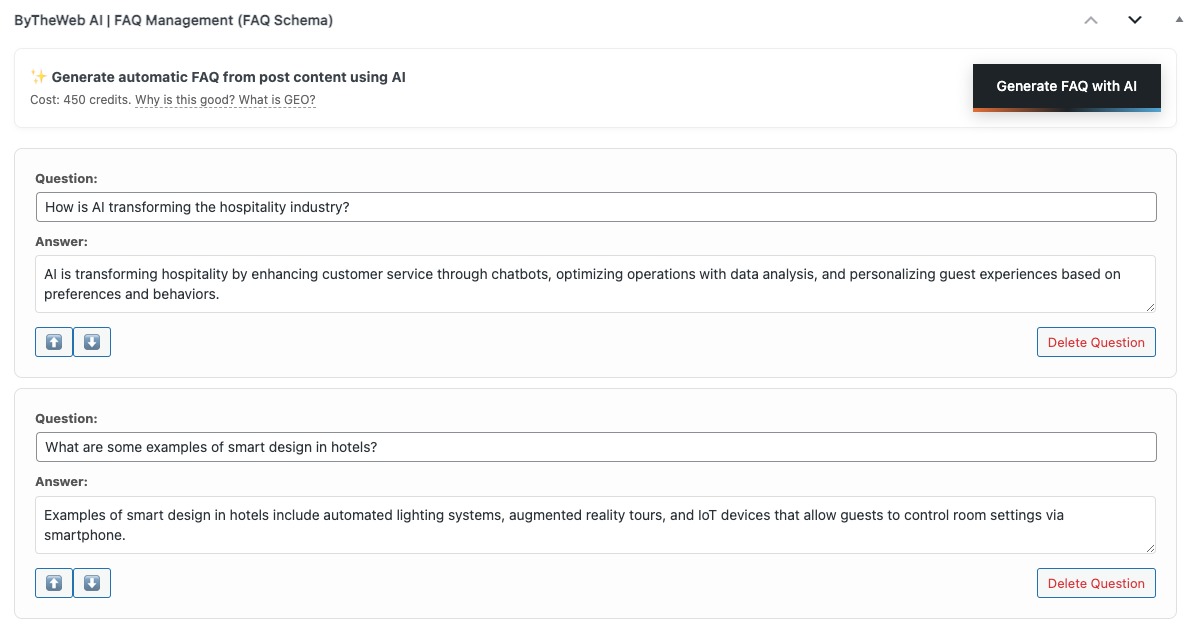
This feature is a true game-changer for the AI era. It adds behind-the-scenes FAQ Schema (Rich Results) to your pages and posts — code only, not visible to visitors — transforming your content into a clear Q&A structure that search engines and AI systems can easily understand. That structured format is easier to extract, reference, and summarize, which can improve AI discovery (GEO) and modern search visibility. In other words, you gain the benefits of Rich Results-ready structured data without changing your page design.
Why this matters?
- SEO: better image relevance, improved on-page context, and stronger content signals
- Accessibility: Alt text improves usability for screen readers
- GEO: clearer visual context helps AI systems interpret and reference your content more accurately
What’s Free?
- Manually add and edit FAQs on any page, post, or custom post type
- Full control: create, update, reorder, and remove Q&A items
- Keep your content clear, structured, and easy to scan.
What’s with Credits?
- Automatically AI generate FAQ suggestions based on the existing page/post content
Site Analysis + Dashboard Alerts
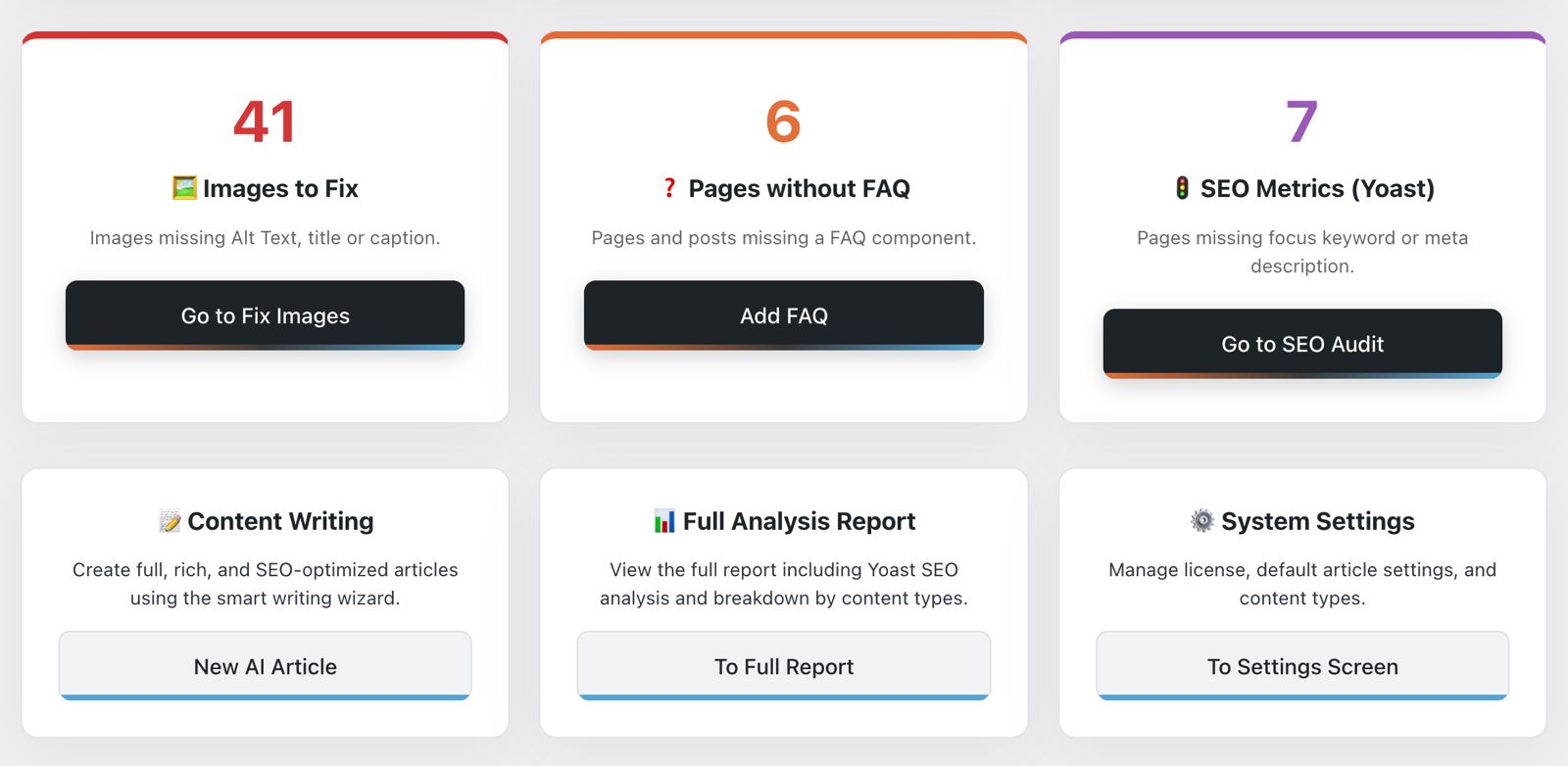
Site Analysis gives you a clear, centralized snapshot of your website’s content health — in seconds. Instead of manually checking pages one by one, you get an organized report that highlights missing or incomplete site elements that impact SEO, GEO (AI readability), and overall content quality. It’s designed to be practical: you immediately see what’s missing, where it’s missing, and what to fix first. The built-in dashboard alerts make it even easier by surfacing issues directly inside WordPress, so you don’t forget them and you can keep improving the site over time.
Why this matters?
- Helps you spot missing content signals that reduce visibility in search and AI discovery
- Improves “machine readability” by encouraging clearer structure and complete metadata
- Keeps site-wide quality consistent as the site grows
What’s Free?
- Centralized site analysis report inside WordPress
- Detects missing or incomplete content elements (for example: missing image data, FAQ coverage, and key meta fields)
- Dashboard alerts/badges that highlight issues and keep them visible
- A cleaner workflow for prioritizing and fixing problems across pages, posts, and CPTs
AI Article Wizard (Content Generation)
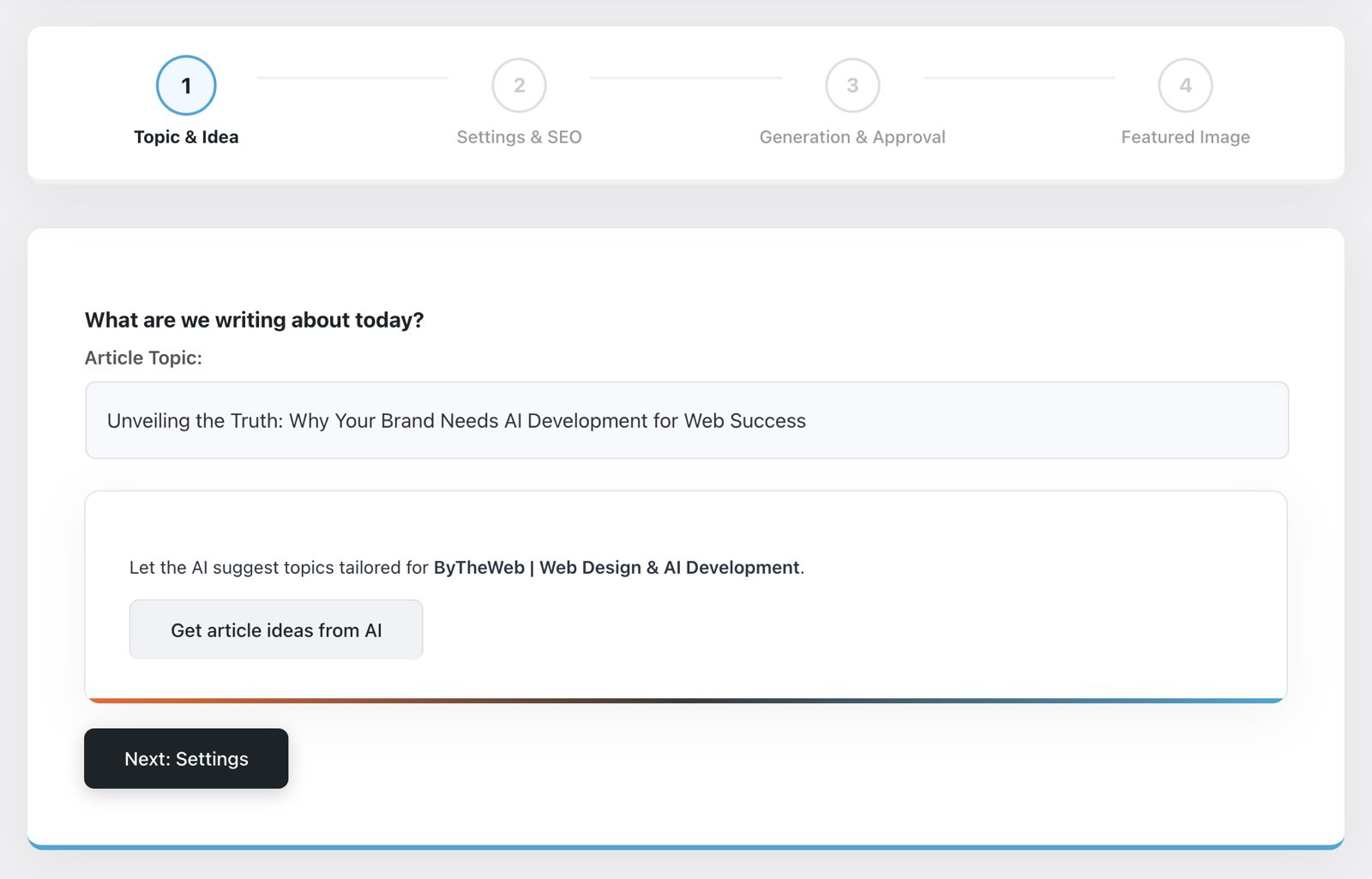
This is your full “content production workflow” inside WordPress — not just a text generator. The AI Article Wizard helps you turn a topic into a ready-to-publish post with a clear structure, better readability, and content that’s easier for both search engines and AI-based systems to understand. In the GEO era, structure is everything: when your content is organized, explicit, and well-formatted, it becomes far more accessible to AI discovery and referencing. The Wizard also connects naturally with your strongest supporting features — like FAQ generation and a featured image — so you can publish complete, professional pages faster, with full editorial control.
Why this matters?
- Helps you publish structured content that is easier to scan, summarize, and reference
- Improves clarity and intent, which supports both SEO ranking signals and AI-readability
- Turns content creation into a repeatable workflow instead of a one-off task
What’s with Credits?
- Generate a structured article draft directly inside WordPress
- Improve readability and flow with clear sections and formatting
- Generate an FAQ block based on the article/page content (optional)
- Generate a realistic featured image for the post (optional) and set it as the featured image
- Review and edit everything before publishing – you stay in control
Auto Pilot (Automated Content Workflow)
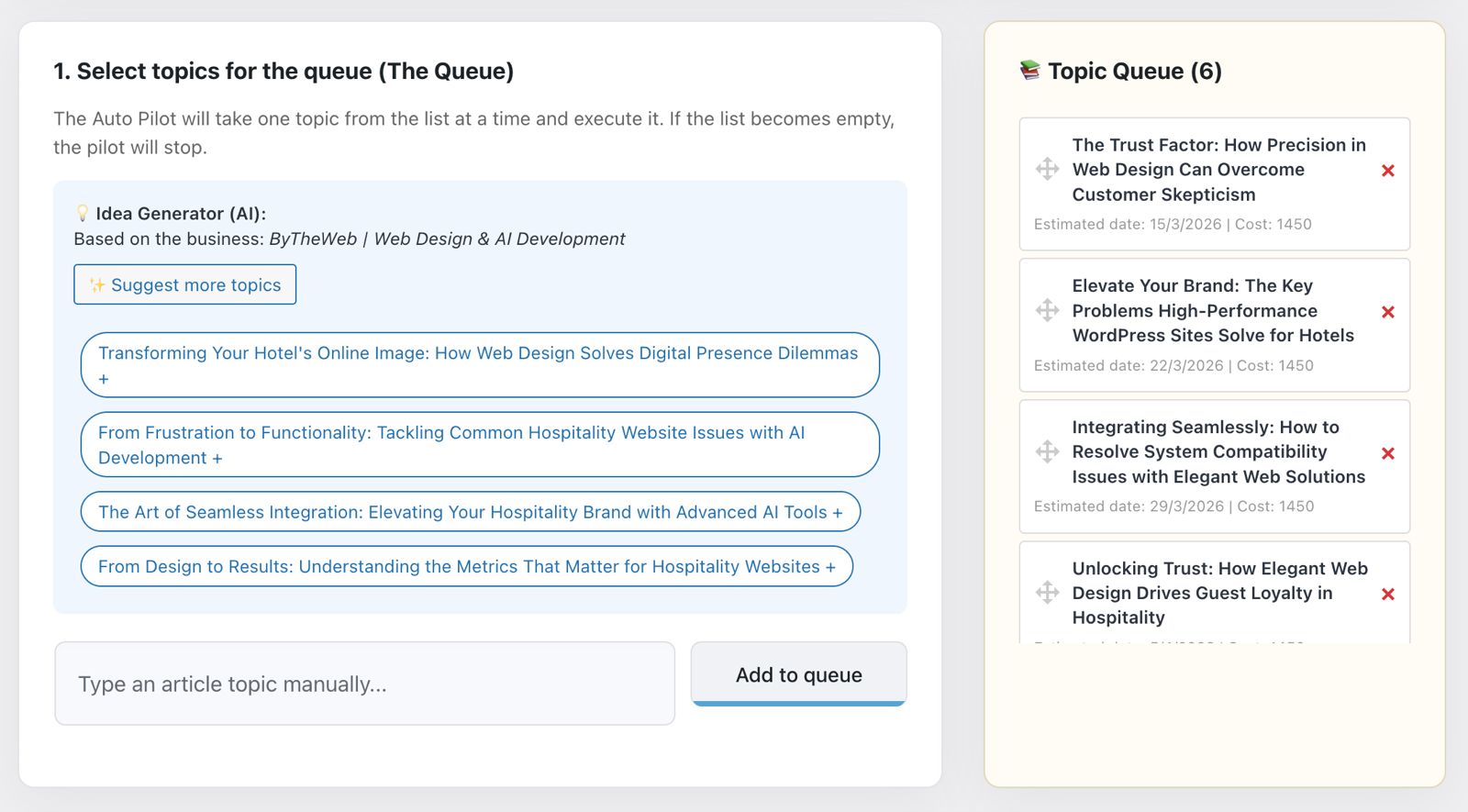
Auto Pilot is the “done-for-you” version of the AI Article Wizard. It uses the same AI content workflow, but adds automation layers that work for you in the background: scheduling, topic queues, and optional auto-publishing. Instead of generating content only when you have time to sit down and create it, Auto Pilot helps you maintain consistency — producing structured drafts (and optional enhancements like FAQs and featured images) on a predictable routine. This is especially powerful in the GEO era, where consistent, well-structured publishing improves how search engines and AI systems understand your site over time.
Why this matters?
- Consistent publishing strengthens topical authority and keeps the site fresh
- Automated, structured drafts are easier for AI systems to parse and reference
- Reduces the “content bottleneck” while keeping human control available
What’s with Credits?
- Automated article creation using the same guided workflow as the AI Article Wizard
- Scheduling controls (run on a routine instead of manual one-offs)
- Topic queue management (plan content in advance and let it run)
- Draft or auto-publish modes (you decide the level of automation)
- Optional enhancements per run: FAQs and a realistic featured image
- Notifications and activity history, so you can track what was created and when
Media Optimization (Alt, Title, Caption & Description)
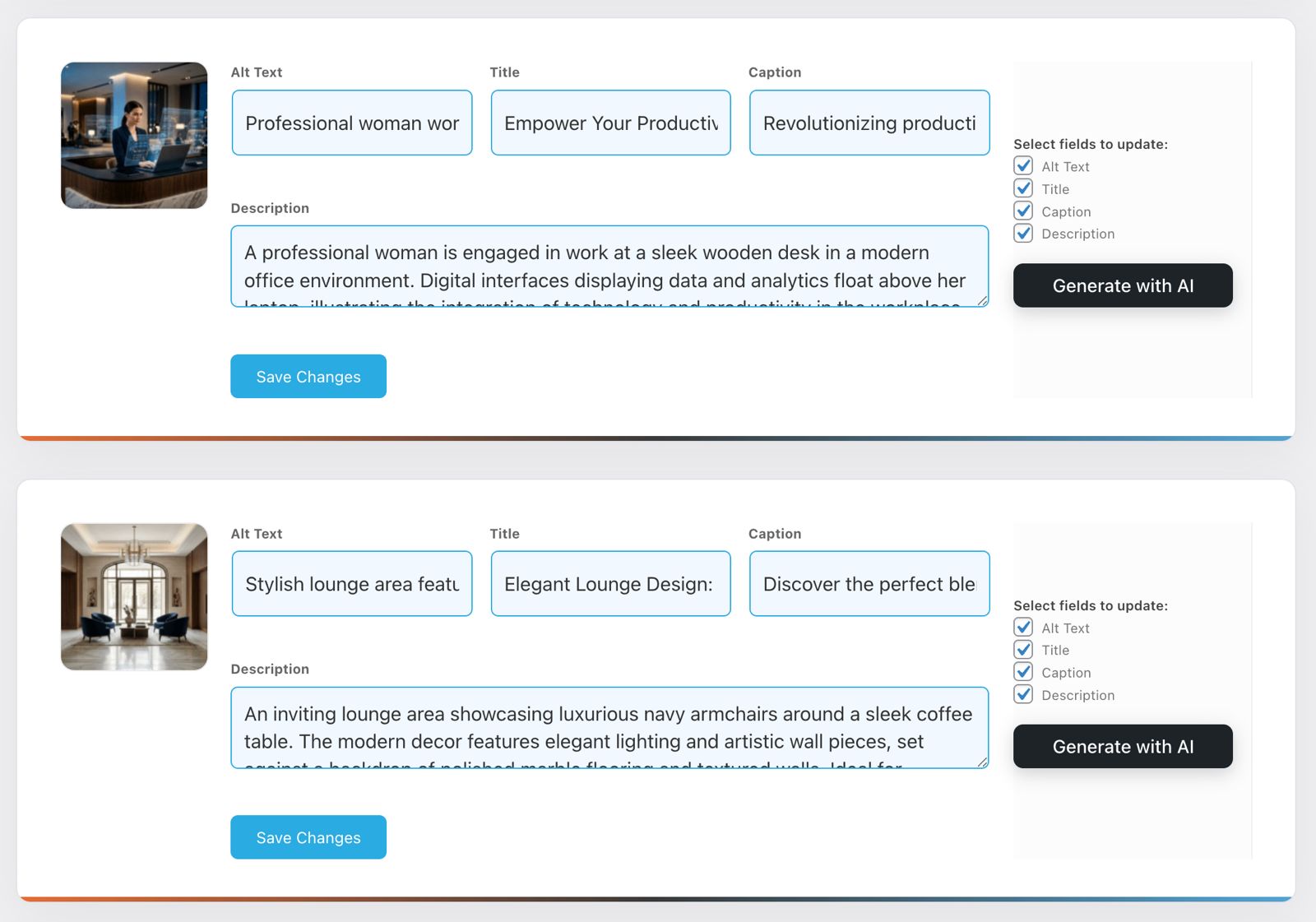
Images are one of the most overlooked SEO assets on a WordPress site — and they’re also a major “blind spot” for AI systems when metadata is missing or inconsistent. Media Optimization turns your image library into structured, searchable, AI-readable content by helping you maintain meaningful Alt text, titles, captions, and descriptions. The result is stronger accessibility, clearer context for search engines, and better discoverability for AI-driven search experiences that rely on clean, descriptive signals to understand what your pages contain.
Why this matters?
- SEO: better image relevance, improved on-page context, and stronger content signals
- Accessibility: Alt text improves usability for screen readers
- GEO: clearer visual context helps AI systems interpret and reference your content more accurately
What’s Free?
- Quickly review and manage key image fields (Alt, Title, Caption, Description)
- Manually edit metadata to match your page context and brand language
- Improve consistency across your media library
What’s with Credits?
- Generate optimized Alt/Title/Caption/Description automatically for selected images
- Create context-aware metadata that matches the page/topic (not generic filler)
- Standardize your media library faster while keeping human review and editing control
- Improve overall “machine readability” of your site’s visual content
Featured AI Image Generator + Image SEO Texts
A strong featured image is more than design – it’s a key part of how people (and machines) understand and trust your content. This feature generates a realistic featured image that matches the article topic, then helps you finalize the image with proper SEO text fields. The result is a post that looks professional immediately, and a media asset that carries clearer context signals for search engines and AI systems – supporting both visibility and consistency at scale.

Why this matters?
- A strong featured image boosts trust, attention, and click-through on your content
- Keeps posts looking professional and consistent without slowing down publishing
- Image SEO texts (alt/title/caption/description) add clear context signals for search engines
- Improves accessibility by providing meaningful alt text for screen readers
What’s with Credits?
- Generate a realistic featured image based on an AI-prepared description (editable before generation)
- Approve and set as the post’s featured image in one click
- Save to media and retry if needed
- Edit the image SEO fields (alt/title/caption/description) before saving
SEO Audit
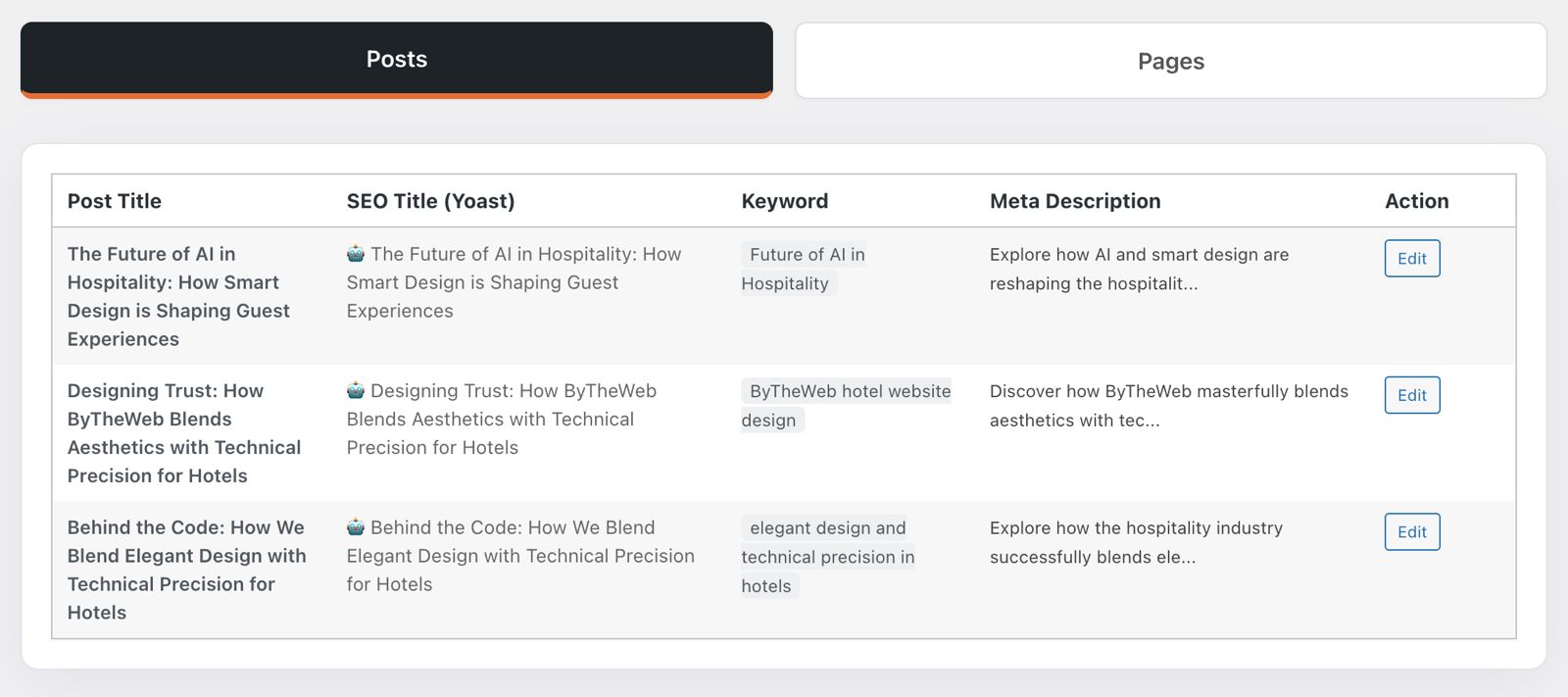
SEO across a WordPress site often breaks down not because you don’t know what to do — but because it’s hard to see everything at once. The SEO Audit feature gives you a clean, centralized view of your Yoast SEO data across your entire site: pages, posts, and custom post types. In one table, you can review each item’s SEO title, focus keyword, and meta description, instantly spot what’s missing, and keep metadata consistent across the website. It’s a simple but highly effective workflow upgrade that saves time, reduces mistakes, and helps you maintain strong SEO fundamentals at scale.
Why this matters?
- Quickly find missing or incomplete Yoast fields across the site
- Improve consistency between pages (titles, keywords, descriptions)
- Prioritize fixes and avoid “forgotten” pages with empty metadata
- Keep your SEO hygiene clean without opening dozens of editors
What’s Free?
- Centralized audit table for Yoast SEO fields (Title / Focus Keyword / Meta Description)
- Works across Pages, Posts, and Custom Post Types
- Clear “Missing” indicators to highlight what needs attention
- Quick “Edit” actions to jump directly into updates
Requirement
- This feature reads SEO fields from the Yoast SEO plugin only
- Yoast must be installed and active to use this overview
SEO Overview (Yoast Titles, Keywords & Meta Descriptions)
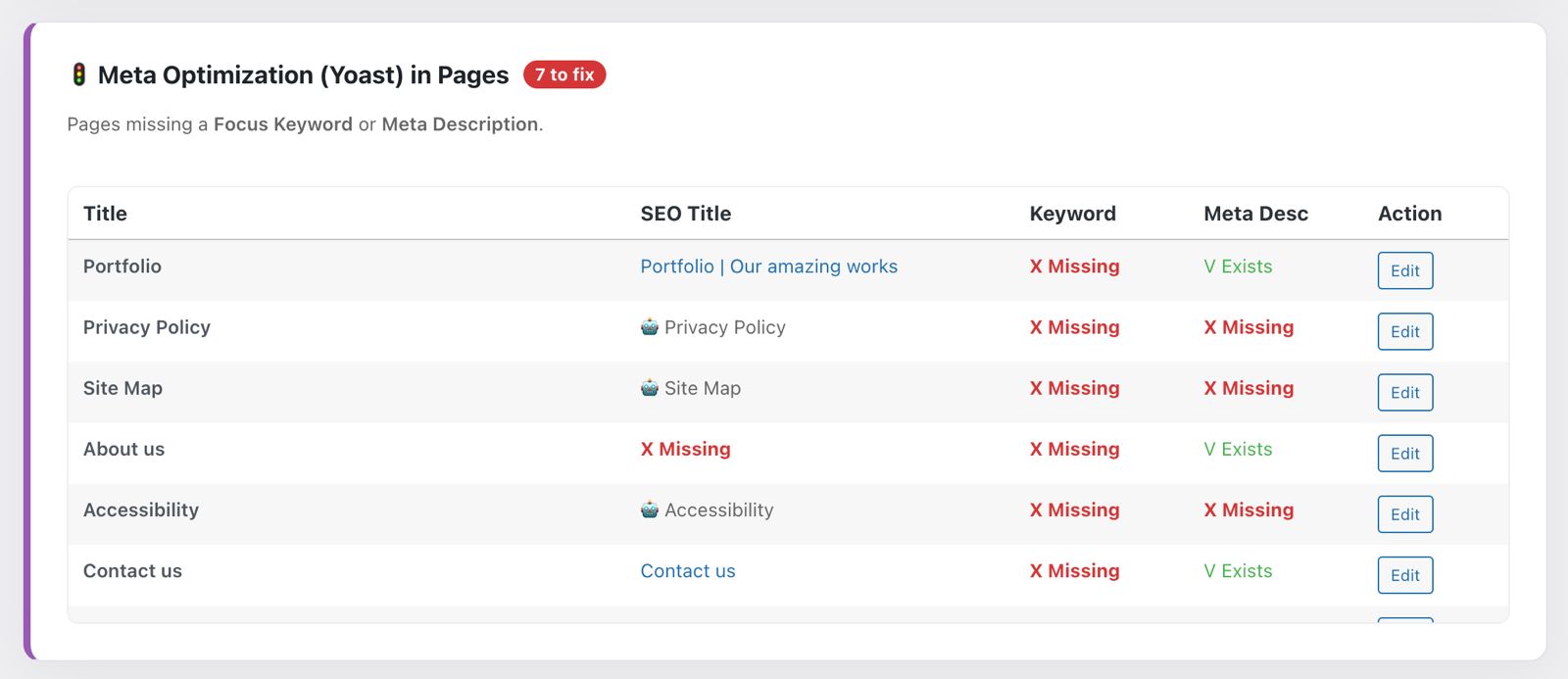
Managing SEO across a full WordPress site is usually scattered and frustrating: you jump between pages, open editors, and hunt for missing titles, keywords, or meta descriptions. This feature solves that by giving you a single, centralized table that shows your Yoast SEO fields across the entire website — pages, posts, and custom post types — all in one place. It’s a simple but powerful workflow upgrade: you instantly spot what’s missing, compare consistency, and jump directly to edit — saving time and keeping your SEO fundamentals clean and organized.
Why this matters?
- Quickly identify missing SEO titles, focus keywords, and meta descriptions
- Keep site-wide SEO consistent (especially on large sites with many pages)
- Reduce the chance of “forgotten” pages with empty metadata
What’s Free?
- Centralized overview of Yoast SEO data across pages/posts/CPTs
- Clear indicators for missing fields (so you know what to fix first)
- Quick “Edit” actions to jump directly into updates
Requirement
- This feature reads SEO fields from the Yoast SEO plugin only
- Yoast must be installed and active to use this overview